From script to upload in under an hour: a creator's workflow
A minute-by-minute walkthrough of producing a 5-minute narrative video, end to end, in 59 minutes - using a single creator, one topic, and a stopwatch.
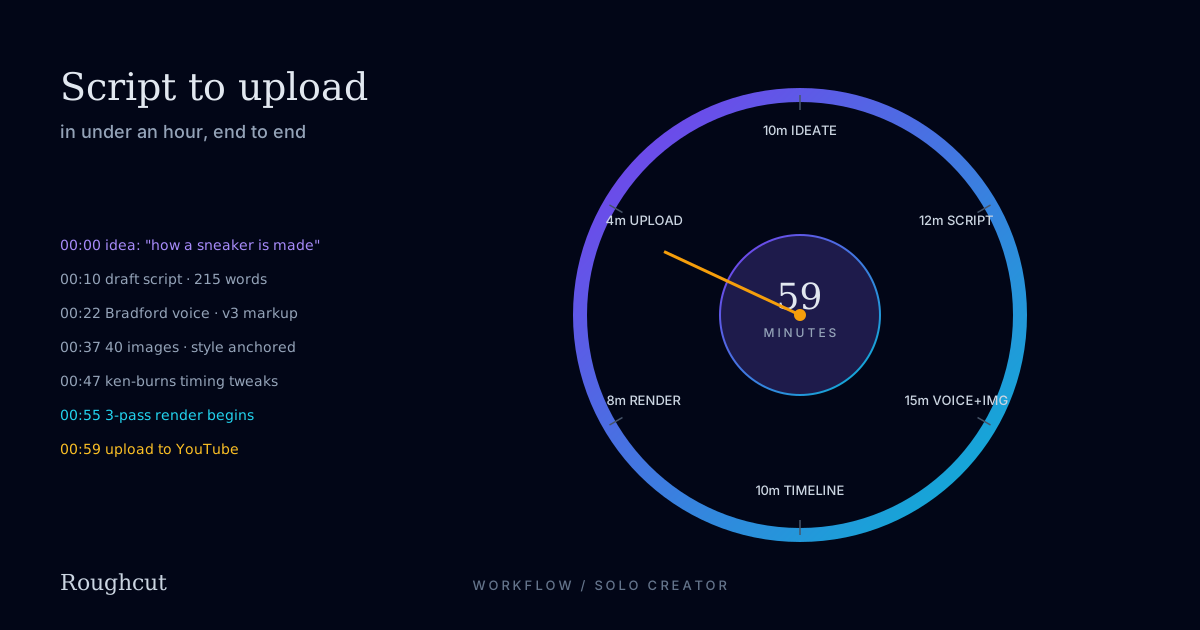
Most "AI video workflow" posts hand-wave the boring parts and pretend nothing ever gets re-rolled. This is not that.
Below is a real minute-by-minute walkthrough of producing a finished 5-minute narrative video on a single topic, by one person, with a stopwatch on the desk. Total elapsed time: 59 minutes. The topic is "how a sneaker is made" - a different piece than the coffee video, so the workflow generalises.
Stopwatch on. Go.
00:00 → 00:10 - Topic and angle (10 min)
This is the only step where AI helps very little.
The blank-page problem with AI video tools is that they will make whatever you ask for. They will not tell you whether what you are asking for is interesting. That is still your job.
For "how a sneaker is made," I spent about ten minutes picking:
- Narrator: POV ("you are a sneaker") - sensory, transformative, fits the 5-minute format. Used the decision framework from POV vs. omniscient narration.
- Five-act structure: Canvas → Cut → Stitched → Soled → Worn.
- Emotional payoff: The stranger's bedroom - the moment the object becomes someone's belonging.
- Visual register: Workshop intimate. Brick walls, warm-tungsten light, hands close to camera. Anchor frame language: "warm tungsten, 35mm film grain, shallow depth of field, slightly desaturated, cinematic."
That's the brief, written down in a Notion page in about ten minutes. Without it, the next 49 minutes would be three hours.
00:10 → 00:22 - Script (12 min)
Open the VideoCue editor, paste the brief into the script-generation prompt, hit generate. The model drafts a five-act script with cue boundaries, voice markup, and image prompts already in place.
First draft of Act 1 came back like this:
[contemplative] You start as a roll of canvas.

The light in this room has not changed in forty years.
[pause] Tungsten. Yellow. A single bulb above a single bench.

Cut. [pause] You become a panel. One of twelve.
The hands that cut you are older than the bulb.
I edited about 30% of the first-draft lines - tightened metaphors, killed two adjectives, fixed one pacing dip in Act 3. Total edit time: about 9 minutes. Script clocked at 1,140 words across 8 V3 generation chunks.
Most of this 12 minutes was reading my own script aloud. The single best script-editing tool I have ever owned is my own voice. If a line doesn't read out loud, it won't narrate.
00:22 → 00:37 - Voice and images (15 min)
Hit the "generate voice + images" button. The pipeline kicks off two parallel jobs:
- Voice: 8 chunks of V3 generation, Bradford voice, Stability=Natural, Style=0. Total wall time: ~2 min. While that runs, I scrubbed through each chunk as it dropped in - the editor plays them inline before the assembly step.
- Images: 36 hero frames in batches of 8, against a single anchor I picked first (a macro shot of canvas under warm tungsten). Total wall time: ~6 min. Same scrubbing - I clicked through frames as they arrived.
Three re-rolls during this window:
- Voice chunk 4: Bradford swallowed a consonant in "stitched in lines you cannot see." One re-roll, second take was clean.
- Frame 12: Drifted to noon-blue cast. Re-rolled with the anchor reference at higher influence.
- Frame 27: Composition issue - the sneaker was facing the wrong way for the cut. Re-rolled with one extra word in the prompt ("heel toward camera").
Total re-roll cost on the wall clock: ~3 minutes. Total spent on this stage: ~15 minutes.
The screen during this stage looks like a four-column grid - script on the left, voice waveforms in column two, image thumbnails in column three, timeline preview in column four. Everything you need to scrub is on one screen.
00:37 → 00:47 - Timeline tuning (10 min)
This is where the editor matters.
The pipeline auto-assembles a first-pass timeline using the cue boundaries from the script. About 80% of the time, it's right. About 20% of the time, you want to nudge:
- Image-to-cue alignment: Two frames landed half a second late against the VO. I dragged them earlier on the timeline.
- Crossfade tightening: The act break between Cut and Stitched (around 2:14) felt too soft. I shortened the crossfade from 400ms to 250ms.
- One hard cut: The "stranger's bedroom" reveal at 4:38 wanted a hard cut, not a fade. Toggled it.
- Music swap: First-draft music was a soft piano cue under Act 4 (Soled). It felt too gentle for the bench-press of the sole onto the upper. Swapped to a more percussive cue.
- Caption tweak: Two long lines wrapped onto three visual lines instead of two. Manually broke them.
Total time: about 10 minutes of clicking and dragging. None of this is rocket science - the timeline tool is intentionally not a Premiere clone. You can move clips, tighten transitions, swap music. That's it.
00:47 → 00:55 - Render (8 min)
Hit render. The pipeline runs the three-pass ffmpeg job. On the Studio priority queue, this video took about 8 minutes wall time - a hair faster than the coffee video because there are fewer fragments (36 frames, not 40, no end-card overlay).
During the render, I:
- Wrote the YouTube title, description, and tags. (The pipeline drafts these from the script. I edited ~20%.)
- Created a thumbnail by exporting frame 8 at 1280×720 and overlaying the title using the editor's thumbnail tool. About 3 minutes of work.
- Brewed coffee.
The render finishes. Preview the MP4 inline. No issues.
00:55 → 00:59 - Upload (4 min)
VideoCue has a one-click YouTube upload. It takes the rendered MP4, the auto-drafted (and edited) metadata, the chapter timestamps (auto-generated from cue boundaries), and pushes them via the YouTube Data API.
Steps:
- Pick the channel. (One click.)
- Confirm metadata. (One look-over.)
- Pick the thumbnail. (Already prepared.)
- Schedule or publish. I scheduled it for the next morning. (One click.)
Total upload-side wall time: about 4 minutes, including a final scan of the auto-tags.
Stopwatch off. 59 minutes elapsed.
What the screen looks like
A rough mental picture of the VideoCue editor at each stage:
- Script stage: Left rail with five act tabs; main pane is the script with inline V3 markup; right rail shows cue boundaries and image prompts.
- Generation stage: Four-column grid. Script. Voice. Images. Preview.
- Timeline stage: Standard horizontal timeline at the bottom, preview pane on top, asset library on the right. The timeline only shows visual cuts, audio waveforms, and music - there are no per-frame video layers like Premiere.
- Render stage: A single full-width progress bar with three sub-bars (one per pass). Logs available in a collapsible drawer for anyone who wants them.
- Upload stage: A single form with title, description, tags, thumbnail, schedule. Channel switcher in the corner.
(Real screenshots are dropping into a future revision of this post; for now, the descriptions are accurate to the build as of today.)
What goes wrong (and what to do)
Three realistic failure modes from running this workflow many times:
Failure 1: Script comes back generic. The first-draft script is bland. Usually because your brief was bland. Fix: rewrite the brief, not the script. Be specific about narrator, register, and the emotional payoff.
Failure 2: One image drifts. A frame comes back in a different palette. Fix: re-roll with the anchor passed as a reference image. 90% of the time the second take matches. If it doesn't, your anchor isn't strong enough - pick a different anchor frame.
Failure 3: Voice "performs" instead of narrates. A chunk comes back with too much expressive flair. Fix: drop Style to 0 if it isn't already, and remove any inline [excited] or [serious] tags. If it still performs, the voice is wrong for the script - try a less expressive voice.
None of these has ever cost more than 3–4 minutes of stopwatch time once you know the moves.
The workflow scales
This is the workflow for one creator on one topic. It scales two ways:
Batching. Run three scripts in parallel during the generation stage. Voice + image jobs run concurrently in the queue. The wall-clock cost of three videos is roughly 90 minutes, not 180.
Templates. If you publish the same shape of video weekly (same narrator, same register, same five-act structure), save it as a template. The brief drops from 10 minutes to 2.
API. Same pipeline is available as a REST call. If you have a CMS that generates briefs from a content calendar, you can produce videos with no editor interaction at all - at the cost of giving up the timeline tuning step. For "weekly news-recap" channels, this is a reasonable trade.
What this hour is really worth
The freelancer-equivalent cost of this video is in the $800–1,500 range. The VideoCue cost is about $2 in provider pass-through and one hour of your time. The exchange rate is roughly 800–1500x.
That ratio is why this category exists. It is also why getting the workflow right matters more than getting any individual feature right - the value is in the cycle time, and the cycle time is in your hands.
What to read next
- Anatomy of a 5-minute AI narrative: "Your Life as One Coffee Bean" - the reference render produced by this exact workflow.
- Writing for V3: ElevenLabs voice markup we actually use - the markup conventions used in the 12-minute script stage above.
- Pricing AI video honestly: what each minute costs - what the $2 provider cost breaks down into.
The free plan is enough to run this workflow end to end on one short video - try it before committing to a paid tier.